Stop losing what you just copied
ClipSlots gives you 9 keyboard-triggered clipboard slots. Press a hotkey to save, press another to paste — in any app, instantly. A tiny macOS daemon, no GUI.
One daemon. Zero bloat.
A single Swift binary with no GUI, no Electron, no subscription. Runs quietly in the background and gets out of your way.
See it in action
$ clipslots --help
OVERVIEW: Lightweight clipboard slot manager for macOS

USAGE: clipslots <subcommand>

OPTIONS:
  --version       Show the version.
  -h, --help      Show help information.

SUBCOMMANDS:
  save            Save current clipboard content to a slot
  paste           Load slot content to clipboard
  list            Show all slots with content preview
  clear           Clear one or all slots
  start           Start the ClipSlots daemon
  stop            Stop the ClipSlots daemon
  restart         Restart the ClipSlots daemon
  status          Show daemon status and configuration
  config          Show or edit configuration
  permissions     Check and guide through permission setup

$ clipslots start
Starting ClipSlots daemon...
ClipSlots daemon started successfully
Logs: /tmp/clipslots.log
$ clipslots status
ClipSlots Status
────────────────
Daemon:      Running (PID: 48291)
Accessible:  Yes
Pasteboard:  Allowed
Slots:       5
Logging:     on (change in 'clipslots config --edit')

Keybinds:
  Save:      ctrl+option+{n}
  Paste:     ctrl+{n}

$ clipslots list
Slot 1: Text (42 chars)
Slot 2: Text (128 chars)
Slot 3: Image (PNG)
Slot 4: (empty)
Slot 5: (empty)

$ clipslots config
ClipSlots Configuration
───────────────────────
Config file: ~/.config/clipslots/config.toml

Slots:       5
Logging:     on

Keybinds:
  Save:      ctrl+option+{n}
  Paste:     ctrl+{n}

Run 'clipslots config --edit' to open in editor.
Your Mac won't notice it
ClipSlots uses zero CPU and around 10MB of RAM. Here's proof — real Activity Monitor screenshots with the daemon running.
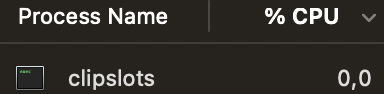
0% CPU
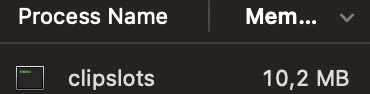
~10 MB RAM
Install in 30 seconds
Clone, build, grant one permission, and you're done.
Build from source
Clone, build, done. Homebrew tap coming soon.
Grant accessibility
macOS needs this to register global hotkeys. One-time step.
Start
That's it. Hotkeys are now live.
# Clone and build
git clone https://github.com/olafglad/clipSlots.git
cd clipSlots
swift build -c release
sudo cp .build/release/clipslots /usr/local/bin/

# Set up and run
clipslots permissions
clipslots start
Free, open source, no catch.
MIT licensed. No telemetry, no account, no server. Star it if it saves you time.